
Hi Guys 👋 welcome back. Finally, today it’s time to create our database, so don’t waste time, and get started. How can you create your database? It’s simple! You have to run the following script:
npx prisma db push
This script creates in your prisma folder a SQLite database called dev.db.
The database’s name is taken from the variable DATABASE_URL in the .env file and inside of the file you can find the next table.
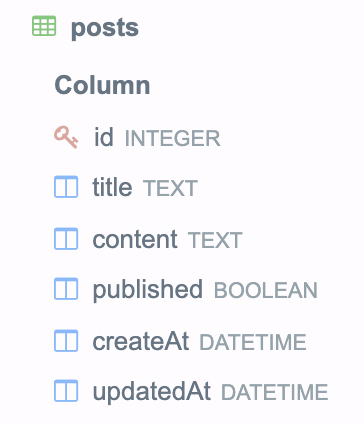 Ok, now you have your database so it’s time to get back at the challenge left open last article.
Run the script
Ok, now you have your database so it’s time to get back at the challenge left open last article.
Run the script
yarn dev
{ posts: [] }
 Ok, there aren’t data but it works 🥳
So now you have a database and you can search data inside it, at this point, it’s time to create relations between our entities, but it’s the goal of the next article 🤪
Ok, there aren’t data but it works 🥳
So now you have a database and you can search data inside it, at this point, it’s time to create relations between our entities, but it’s the goal of the next article 🤪
That’s all for today guys! See you soon Bye Bye 👋
You can find the code relative to this post in the GitHub repository